

Events
Create an Event
Create marketing events to organize seminars, webinars, workshops, dinners, and other customer events. Events can be created from a campaign or directly from the Open Events section.
Overview
Section titled “Overview”Events help you organize marketing activities, track attendees, and measure event performance.
You can create an event:
- From an existing Campaign
- Directly from the Open Events section
Create an Event from a Campaign
Section titled “Create an Event from a Campaign”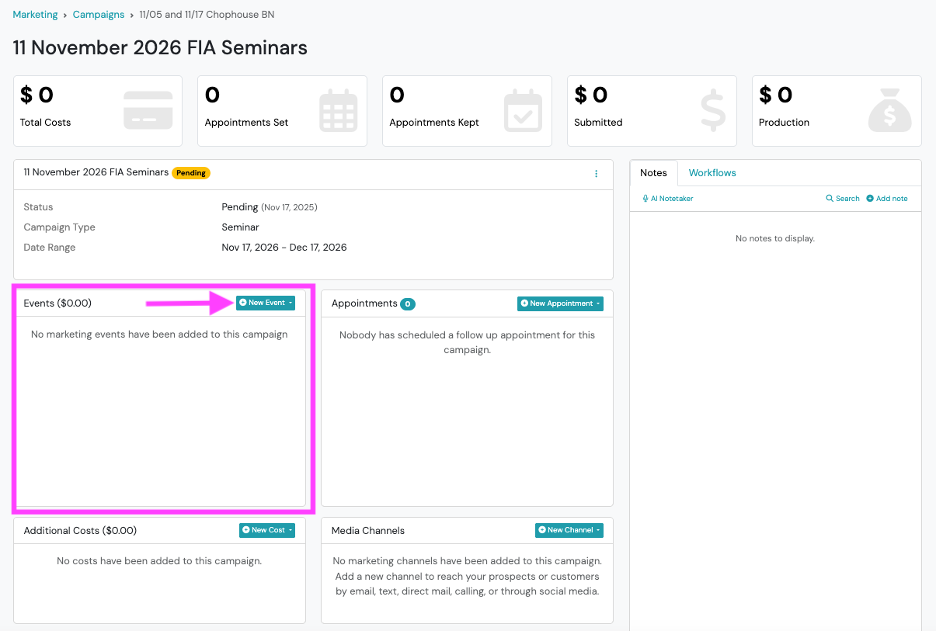
- From the left navigation menu, click Marketing.
- Under Open Campaigns, select the desired campaign.
- From Campaign page, click + New Event.
- Select the desired Event Type.
- Complete New Event form.
- Click Save.
Create an Event from the Open Events Tile
Section titled “Create an Event from the Open Events Tile”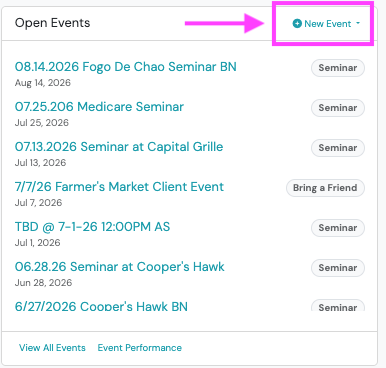
- From left side navigation menu, go to Marketing.
- Go to Open Events, click +New Event button
- From drop-down selection menu, select the desired Event Type.
- Complete New Event form.
- Click Save.
Event Fields
Section titled “Event Fields”Complete the following fields when creating an event.
| Field | Description |
|---|---|
| Status | Select Pending, Open, Closed, or Canceled. |
| Name | Enter a descriptive name for the event. |
| Description | Optionally provide additional event details. |
| Start On | Select the event start date and time. |
| End On | Select the event end date and time. |
| Assigned To | Select the Swivel user responsible for the event. |
| User Calendars | Select additional users to add the event to their calendar. |
| Venue | Select the event location. |
| Tags | Optionally add tags to organize and filter events. |
Best Practices
Section titled “Best Practices”Start the event name with the date
Section titled “Start the event name with the date”Events are displayed in alphanumeric order throughout Swivel. To keep events organized chronologically, we recommend beginning the event name with the event date.
Examples
Section titled “Examples”✅ 2026-09-15 | Medicare Dinner | Springfield
✅ 2026-10-08 | Retirement Workshop | Kansas City
🚫 Medicare Dinner - September 15
Starting the event name with the date makes it easier to locate events and keeps event lists organized as your marketing calendar grows.
Frequently Asked Questions
Section titled “Frequently Asked Questions”Can I create an event without a campaign?
Section titled “Can I create an event without a campaign?”Yes. You can create an event directly from the Open Events section.
Do I need to create a venue before creating an event?
Section titled “Do I need to create a venue before creating an event?”Yes. A venue must exist before it can be selected when creating an event.
What event statuses are available?
Section titled “What event statuses are available?”Events can have one of the following statuses:
- Pending
- Open
- Closed
- Cancelled
Can events be created automatically?
Section titled “Can events be created automatically?”Yes. If your organization uses a supported event registration integration, such as LeadingResponse or LeadJig, campaigns and events may be created automatically. Contact your LeadingResponse or LeadJig representative to learn more about enabling this integration.
Can I change an event after it has been created?
Section titled “Can I change an event after it has been created?”Yes. Open the event to update its name, dates, assigned user, venue, tags, status, or other event details.