

Getting Started
Understanding Contact Lists
Start here to learn the difference between Dynamic and Static Lists.
Contact Lists help you organize, segment, and engage groups of contacts in Swivel. Whether you’re sending a marketing campaign, managing event attendees, tracking outreach, or building follow-up workflows, lists make it easy to work with the right audience.
Swivel supports two types of lists:
- Dynamic Lists - automically update based on filter criteria
- Static Lists - fixed snapshots of contacts that only change when manually updated
Choosing the right list type depends on whether you want your audience to stay current automatically or remain unchanged over time.
When to Use Contact Lists
Section titled “When to Use Contact Lists”Contact Lists are commonly used for:
- Broadcast email campaigns
- Broadcast text message campaigns
- Event invitations and follow-up
- Call-down and outreach campaigns
- Birthday outreach
- Re-engagement campaigns
- Tracking outreach progress with dispositions
- Creating targeted marketing audiences
Dynamic Lists
Section titled “Dynamic Lists”A Dynamic List automatically updates based on the filter criteria used to create it.
Each time you open the list or send a campaign, Swivel re-evaluates the criteria against your current database and returns all matching contacts in real time.
When to Use a Dynamic List
Section titled “When to Use a Dynamic List”Use a dynamic list when your audience should continuously stay up to date without manual maintenance.
Example
_“All active clients in Texas with birthdays this month.”_
If a new qualifying contact is added tomorrow, they will automatically appear in the list.
Benefits of Dynamic Lists
Section titled “Benefits of Dynamic Lists”- Automatically refreshes
- Always reflects current data
- Great for ongoing workflows and recurring campaigns
Important Considerations
Section titled “Important Considerations”Because Dynamic Lists continuously update:
- Contact counts may change over time
- New qualifying contacts may appear automatically
- Contacts may drop off if they no longer match the criteria
Static Lists
Section titled “Static Lists”A Static List is a fixed snapshot of contacts at a specific point in time.
Once created, contacts only change when someone manually adds or removes contacts from the list.
When to Use a Static List
Section titled “When to Use a Static List”Use a static list when you need a consistent audience that should not change automatically.
Example
- Seminar attendees from a past event
- A curated re-engagement campaign
- A compliance or audit snapshot
- A one-time outreach campaign
Benefits of Static Lists
Section titled “Benefits of Static Lists”- Predictable audience membership
- Auditable contact snapshots
- Campaigns target exactly the selected contacts
Important Considerations
Section titled “Important Considerations”Static Lists do not update automatically. If new contacts should be added later, they must be manually added to the list.
Dynamic vs Static Lists
Section titled “Dynamic vs Static Lists”| Feature | Dynamic List | Static List |
|---|---|---|
| Contacts included in the list | Recomputed on each view | Fixed snapshot |
| How contacts are added | Based on filter criteria | Saved at creation |
| How contacts are removed | Criteria updates | Manual removal |
| Best for | Ongoing audiences | One-time campaigns |
| Shows “Excluded Contacts” | Yes | No |
| Shows Building status | No | Yes (during initial build) |
How to Choose the Right List Type
Section titled “How to Choose the Right List Type”Use a Dynamic List when:
- Your audience changes regularly
- You want new qualifying contacts included automatically
- You are building ongoing campaigns or workflows
- You are managing event attendees or one-time outreach
Use a Static List when:
- You need a frozen audience snapshot
- You want consistent campaign recipients
- You are managing event attendees or one-time outreach
How to Identify List Type
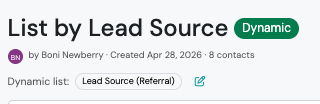
Section titled “How to Identify List Type”Lists are labeled with a badge next to the list name:
-
Dynamic (green badge)
-
Static (purple badge)

Common Contact List Uses
Section titled “Common Contact List Uses”After creating a Contact List, you can:
- Send broadcast emails
- Send broadcast text messages
- Track outreach progress using dispositions
- Export contacts
- Create appointments
- Create opportunities
- Create products
- View communication results
- Perform 1-to-1 outreach
Best Practices
Section titled “Best Practices”Use clear naming conventions
Section titled “Use clear naming conventions”Choose list names that make the audience easy to identify later.
Use Static Lists for one-time campaigns
Section titled “Use Static Lists for one-time campaigns”If you need an exact audience that won’t changes between review and send, use a Static List
Use Dynamic lists for recurring outreach
Section titled “Use Dynamic lists for recurring outreach”Dynamic Lists work best for ongoing workflows where contacts hould flow in and out automatically based on criteria.