

Getting Started
Update a Static List
Static Lists contain a fixed set of contacts that only change when you manually add or remove contacts.
Unlike Dynamic Lists, Static Lists do not automatically refresh based on filter criteria. This makes them ideal for one-time campaigns, event attendees, curated outreach groups, or auditable audience snapshots.
When to Use This
Section titled “When to Use This”Use this article when you need to:
- Add contacts to an existing Static List
- Remove contacts from a Static List
- Bulk add filtered contacts to a Static List
- Manage outreach or campaign audiences manually
Add Specific Contacts to a Static List
Section titled “Add Specific Contacts to a Static List”Use this option when you want to manually select individual contacts to add.
-
Open the desired Static List
-
Click +Add Contacts
-
Search for the desired contact(s)
-
Select the checkbox next to each contact
-
Click Add Selected
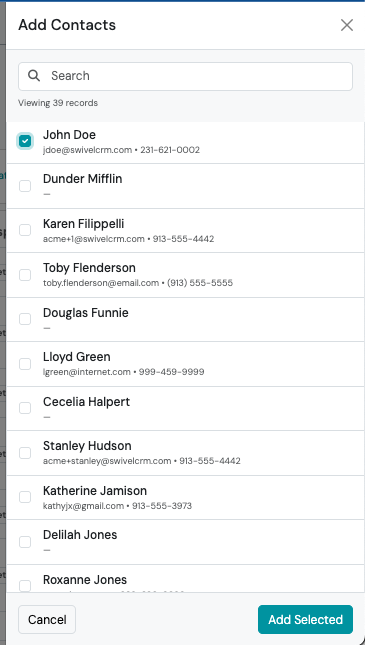
The count badge on the list updates immediately. You can repeat as many times as you like.
Bulk Add Contacts Using Filters
Section titled “Bulk Add Contacts Using Filters”Use this option when you want to add all contacts matching specific criteria instead of selecting contacts one-by-one.
-
From the left-side navigation menu, click Contacts
-
Click Advanced Filters
-
Apply the desired Contact and/or Product filters
-
Click Filter
-
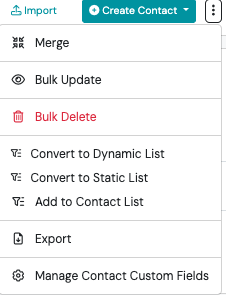
Click the ⋮ three-dot action menu (next to the +Create Contact button)
-
Select Add to Contact List
-
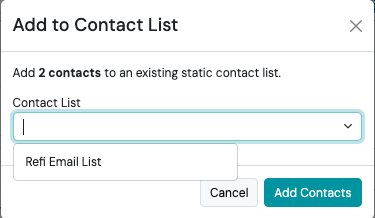
Select the desired Static Contact List
-
Click Add Contacts
Swivel will begin processing the update and display a progress indicator while contacts are added.
Remove a Contact from a Static List
Section titled “Remove a Contact from a Static List”You can remove a contact from both Dynamic and Static Lists.
-
Open the Desired List
-
Find the Contact you wish to remove and click the Red User Icon
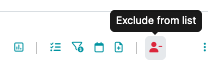
The contact’s row disappears immediately, and the count at the top of the list updates.
Excluded Contacts
Section titled “Excluded Contacts”When a contact is removed from a list, they appear in the Excluded Contacts section on the top engagement bar.

Excluded Contacts help prevent removed contacts from being unintentionally re-added during future list updates or refreshes.