

Reports
Appointments Report
Review appointment activity, meeting outcomes, and client engagement by appointment type, status, date range, or event.
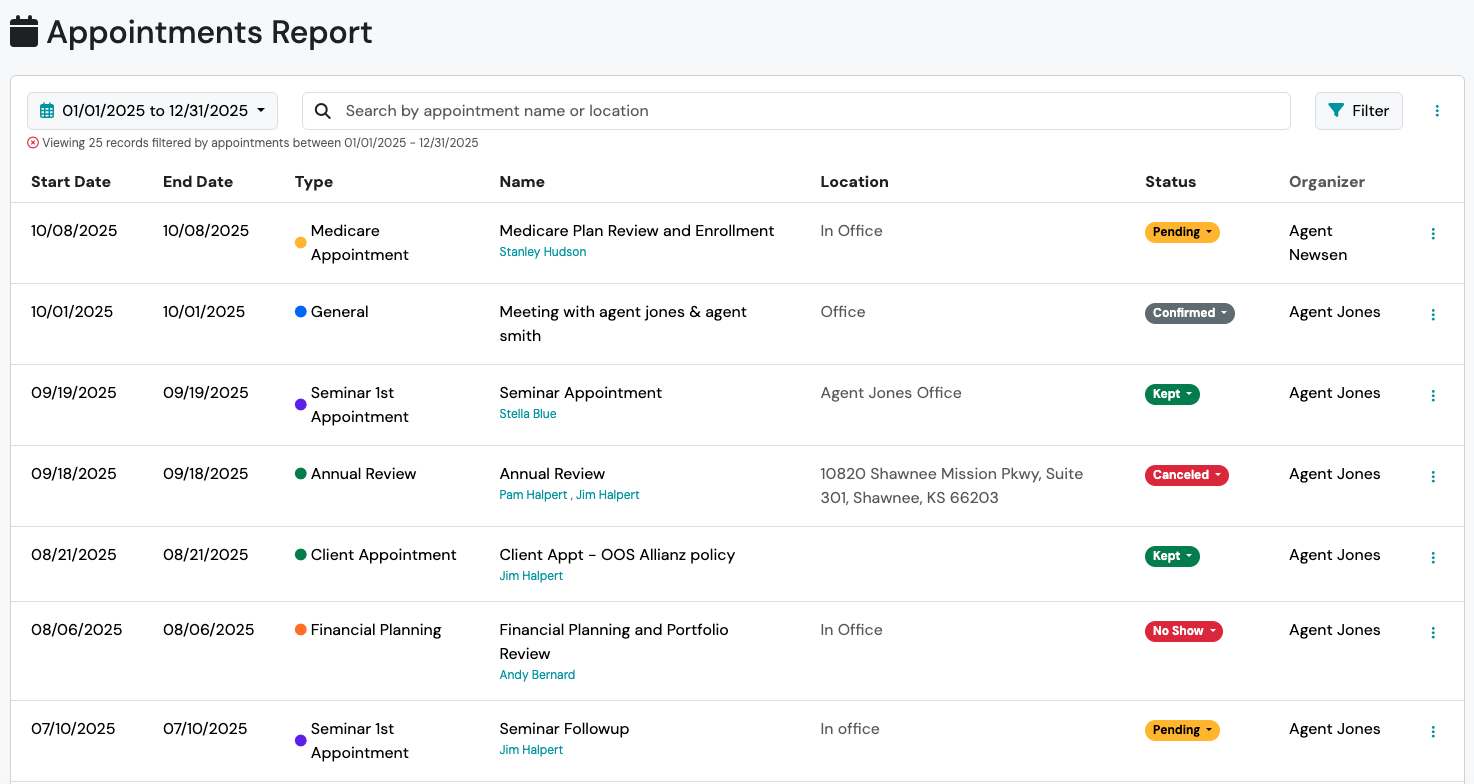
The Appointments Report provides visibility into scheduled client meetings, appointment activity, and appointment outcomes across your organization.
Use this report to:
Section titled “Use this report to:”- Review upcoming and historical appointments
- Track appointment activity by advisor or team member
- Monitor appointment outcomes and statuses
- Identify canceled, rescheduled, or missed appointments
- Export appointment data for additional analysis
- Create follow-up and service-related contact lists
What You’ll See in the Appointments Report
Section titled “What You’ll See in the Appointments Report”The Appointments Report displays:
- Start date
- End date
- Appointment Type
- Appointment Name
- Location
- Status
- User Calendar(s)
Common Uses
Section titled “Common Uses”The Appointments Report is commonly used to:
- Review advisor activity
- Monitor client engagement
- Track annual reviews and service appointments
- Identify appointments requiring follow-up
- Review canceled, no-show, or rescheduled appointments
- Export appointment activity for reporting purposes
Filtering the Appointments Report
Section titled “Filtering the Appointments Report”The Appointments Report supports date range and appointment-specific filtering.
Date Range Filter
Section titled “Date Range Filter”Use the Calendar filter to review appointments within a specific date range.
Appointment Types
Section titled “Appointment Types”Filter by appointment types configured for your organization, such as:
- Annual Review
- Policy Delivery
- Client Meeting
- Workshop
- Other custom appointment types
Appointment Statuses
Section titled “Appointment Statuses”Filter by appointment status:
- Canceled
- Confirmed
- Kept
- No Show
- Pending
Marketing Events
Section titled “Marketing Events”Filter appointments associated with specific Marketing Events.
Editing Appointments from the Report
Section titled “Editing Appointments from the Report”The Appointments Report allows users to update appointments without leaving the report.

To edit an appointment:
Section titled “To edit an appointment:”- Locate the appointment.
- Select the Action Menu.
- Choose Edit.
- Update the appointment details or appointment type.
- Save your changes.
Updating Appointment Statuses
Section titled “Updating Appointment Statuses”Appointment statuses can be updated directly from the report.
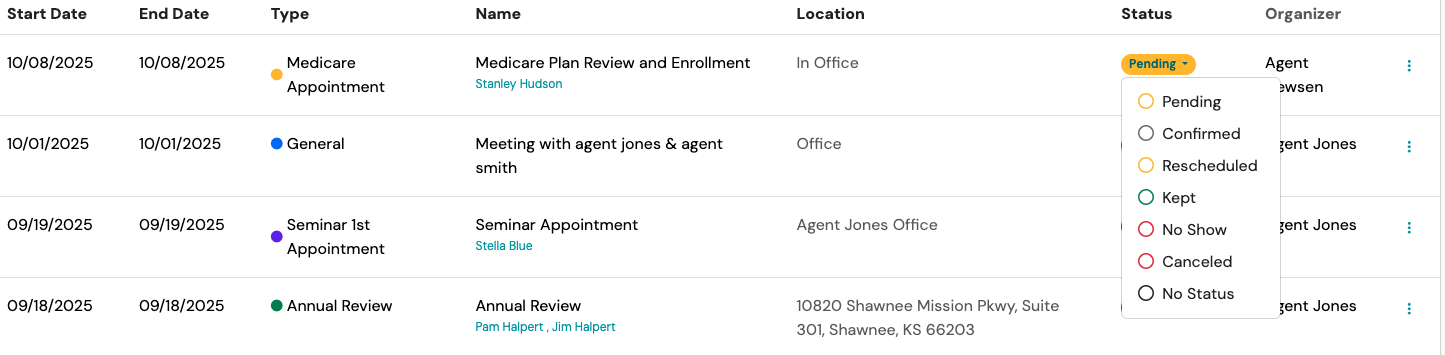
To update an appointment status:
Section titled “To update an appointment status:”- Locate the appointment.
- Select the status badge.
- Choose the desired status.
Available statuses include:
Section titled “Available statuses include:”- Canceled
- Confirmed
- Kept
- No Show
- Pending
- Rescheduled
Exporting the Appointments Report
Section titled “Exporting the Appointments Report”To export appointment data:
Section titled “To export appointment data:”- Navigate to Reports > Appointments Report.
- Apply any desired filters.
- Select the Action Menu.
- Click Export.
Best Practices
Section titled “Best Practices”Many organizations use the Appointments Report to monitor service activity and client engagement.
Consider reviewing the report regularly to:
Section titled “Consider reviewing the report regularly to:”- Verify annual reviews are being completed
- Identify clients who missed scheduled appointments
- Monitor advisor appointment activity
- Track appointment trends over time
- Follow up on canceled or rescheduled meetings
Can I edit appointments directly from the report?
Section titled “Can I edit appointments directly from the report?”Yes. The Appointments Report allows you to edit appointment details and appointment types directly from the report.
Can I update appointment statuses from the report?
Section titled “Can I update appointment statuses from the report?”Yes. Appointment statuses can be updated by selecting the status badge and choosing a new status.
Can I export appointment data?
Section titled “Can I export appointment data?”Yes. Use Action Menu > Export to export appointment results as a CSV file.
Can I review appointments for a specific appointment type?
Section titled “Can I review appointments for a specific appointment type?”Yes. Use the Appointment Type filter to review specific categories of appointments, such as Annual Reviews or Policy Deliveries.
Can I create a list from appointment results?
Section titled “Can I create a list from appointment results?”Yes. The Appointments Report can be converted into a Static List for additional workflows and follow-up activities.