

Reports
Sales Report
Review production, compensable amounts, pending business, and policy activity by advisor, office, or product type.
Sales Report
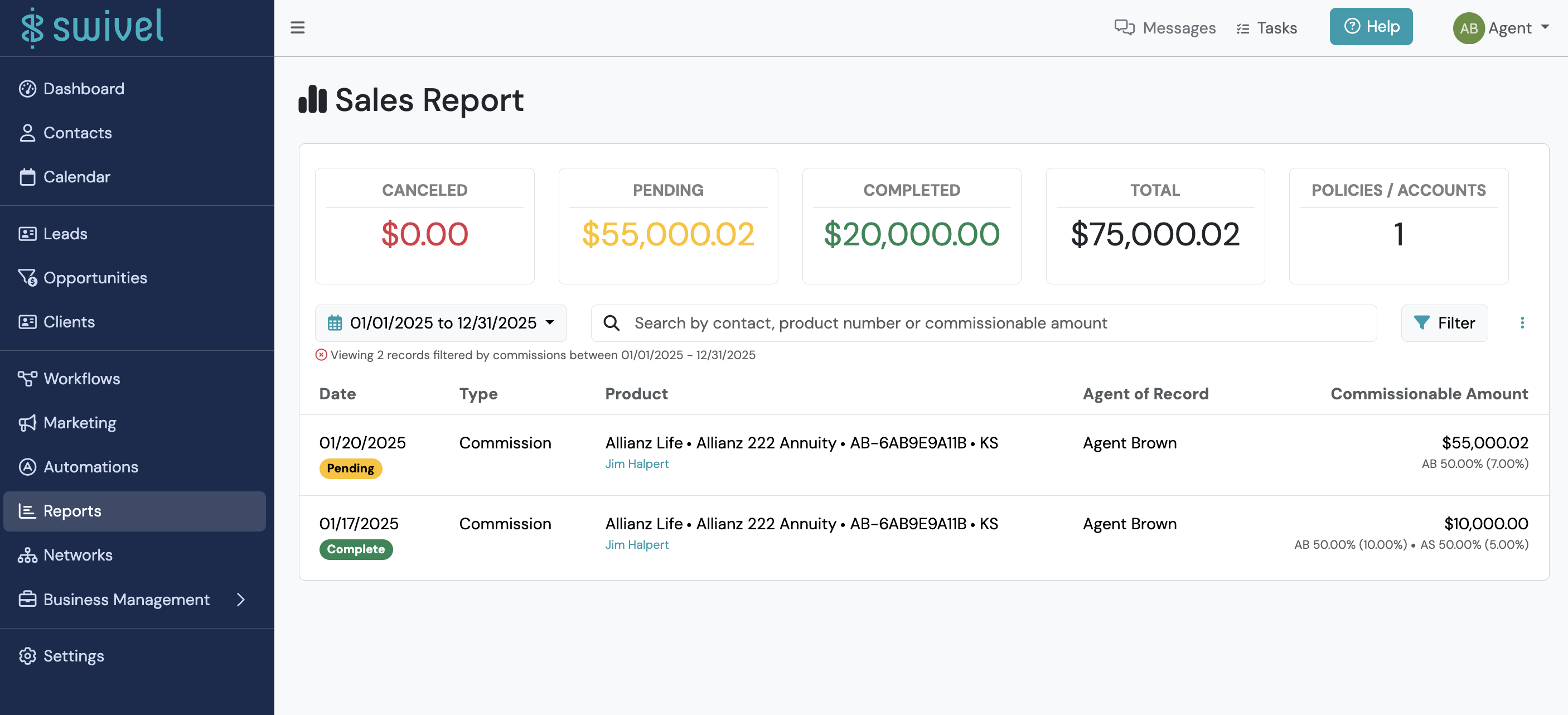
Section titled “Sales Report”The Sales Report provides visibility into sales activity, compensable amounts, and policy production across your organization.
Use this report to:
Section titled “Use this report to:”- Review production by agent
- Monitor pending and completed compensable amounts
- Track policy and account activity
- Analyze sales trends over time
- Export production data for additional analysis
What You’ll See in the Sales Report
Section titled “What You’ll See in the Sales Report”The Sales Report displays sales activity by account and policy, including associated compensable amounts.
In addition to detailed results, the report includes summary metrics showing:
- Canceled Compensable Amounts
- Pending Compensable Amounts
- Completed Compensable Amounts
- Total amount (Pending + Completed)
- Count of Policies/Accounts
Sales Dashboard Widgets
Section titled “Sales Dashboard Widgets”The Sales Report is also accessible directly from several production widgets on the Dashboard.
Selecting any of the following widgets will automatically open the Sales Report with the corresponding production data:
- Lifetime Production
- Weekly Production
- Monthly Production
- Yearly Production
This allows you to quickly move from high-level production metrics to the detailed policies and accounts contributing to those results.
How to Filter the Sales Report
Section titled “How to Filter the Sales Report”- Navigate to Reports > Sales Report.
- Adjust the date range as needed.
- Select Filter to further refine your results.
Available Filters
Section titled “Available Filters”The Sales Report supports Contact and Product filters to help narrow results by advisor, product information, assignments, tags, and other criteria.
For a complete list of available filters and filter definitions, see Understanding Filters in Swivel.
- Select Filter to apply your criteria.
Exporting the Sales Report
Section titled “Exporting the Sales Report”To export the report:
- Select the Action Menu.
- Click Export.
Best Practices
Section titled “Best Practices”The Sales Report is commonly used to:
- Review production by advisor or office
- Monitor pending business
- Track completed business volume
- Analyze compensable production trends
- Prepare production reports for leadership meetings
Create a Static List from Report Results
Section titled “Create a Static List from Report Results”The Sales Report can be converted into a Static List for additional workflows, segmentation, and follow-up activities. See Contact Lists.
What is the difference between Pending and Completed Compensable Amounts?
Section titled “What is the difference between Pending and Completed Compensable Amounts?”Pending compensable amounts represent business that has not yet reached a completed compensation status.
Completed compensable amounts represent business that has reached a completed compensation status.
Why do my totals change when I apply filters?
Section titled “Why do my totals change when I apply filters?”All metric tiles and report results update automatically based on the filters currently applied.
Can I export sales data?
Section titled “Can I export sales data?”Yes. Use Action Menu > Export to export the report results.
Can I review production for a specific advisor?
Section titled “Can I review production for a specific advisor?”Yes. Apply filters to narrow results to a specific advisor, office, product type, or other criteria.
Can I create a list from Sales Report results?
Section titled “Can I create a list from Sales Report results?”Yes. Sales Report results can be converted into a Static List for additional analysis and follow-up.
Related Articles
Section titled “Related Articles”- Reports
- Understanding Filters in Swivel
- Contact Lists
- Export Data via Reports
- Product Report