

Adding & Managing Policy and Account Values
Transactions and Transaction Types
What are Transactions and Transaction Types?
Section titled “What are Transactions and Transaction Types?”A transaction represents any activity that represents funds going in and out of an account (ie. transfer). A transaction type identifies the type of activity that occurs within an account or policy.
Swivel has the following Transaction Types pre-configured for your account:
- Contribution
- Transfer
- Withdrawal
How do I add manage Contributions and Withdrawals
Section titled “How do I add manage Contributions and Withdrawals”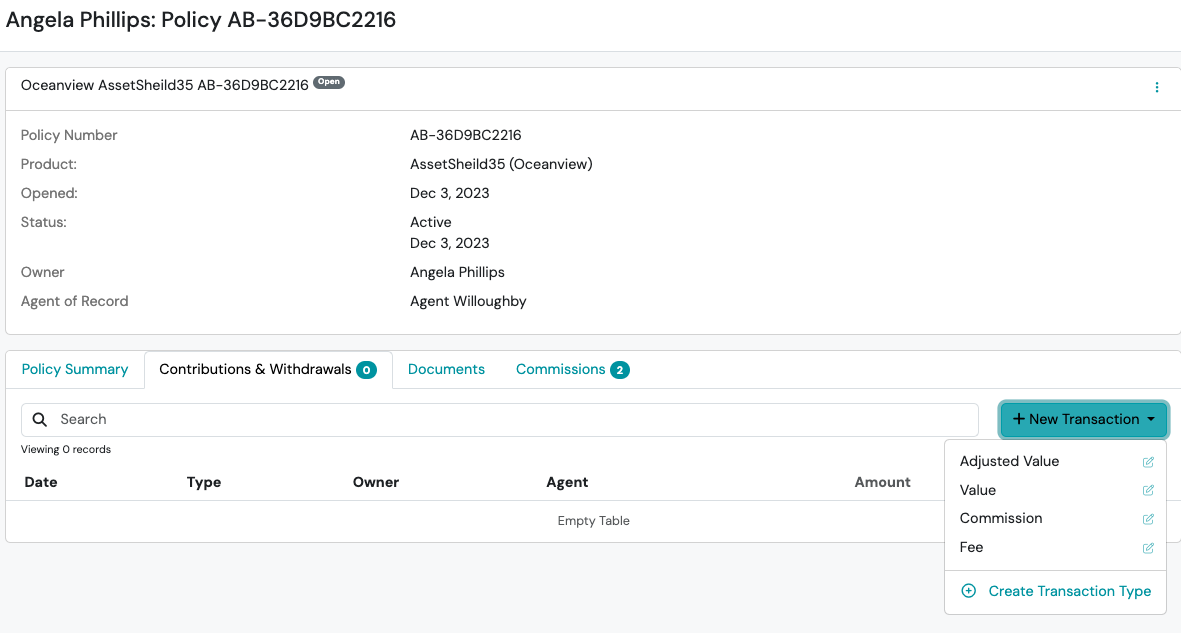
Step-by-step directions:
Section titled “Step-by-step directions:”-
Navigate to the desired Contact and, if necessary, create the desired Product.
-
Click the Product and select the Contributions & Withdrawals tab and < click +New Transaction
-
Select the Transaction Type and complete the New Transaction slide out form
- Transaction Type
- Date
- Amount
- Repeat Frequency (One Time Only, Monthly, Quarterly, Yearly)
- Responsible
- Reference #
- Additional Reference Information
- Note
-
Click Save
Add New Transaction Types from Contributions & Withdrawals tab
Section titled “Add New Transaction Types from Contributions & Withdrawals tab”Step-by-step directions:
Section titled “Step-by-step directions:”-
Navigate to the desired Contact and, if necessary, create the desired Product.
-
Click the Product and select the Contributions & Withdrawals tab and > click then > click the +Create Transaction Type button
-
Complete the New Transaction Type slide out form
-
Name
-
Description
-
Transaction Intent
- Unspecified
- Transfer
- Withdrawal
- Contribution
-
Force Value
- None
- Positive
- Negative
-
Institution Required (Yes, No)
-
Payment Method Support (None, Optional, Required)
-
Position
-
-
Click Save