

Adding & Managing Policy and Account Values
Adding & Updating Values for Products
Learn how product values are populated through Swivel Sync or added manually, including how to troubleshoot missing values when mapping to Swivel Summary totals and missing Update Values buttons.
Overview
Section titled “Overview”Product values can be created and populated automatically through Swivel Sync for supported carriers and institutions, or added manually through Manage Values when the carrier or institution isn’t supported by Swivel Sync or Swivel Sync doesn’t provide the needed value.
Creating Product Values with Swivel Sync
Section titled “Creating Product Values with Swivel Sync”For policies and accounts from Swivel Sync-supported carriers and institutions, the first successful sync of an instance of a product creates the supported product values.
If no instances of the product have synced yet, sync a policy or account for that product first.
To see which carriers, institutions, and values are supported, visit the Values Supported section on the carrier or institution pages in Swivel Sync Carriers & Institutions.
If the carrier or institution isn’t supported by Swivel Sync, you can add the product values manually through Manage Values.
Adding Product Values Manually
Section titled “Adding Product Values Manually”Adding Product Values from a Contact Record
Section titled “Adding Product Values from a Contact Record”From a Contact record:
-
Navigate to the Products section.
-
Click the desired Product.
-
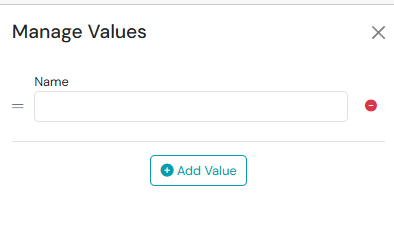
Click the three-dot action menu and select Manage Values.
-
Complete the Manage Values form.
-
Click Save.
Adding Product Values from Advanced Setup
Section titled “Adding Product Values from Advanced Setup”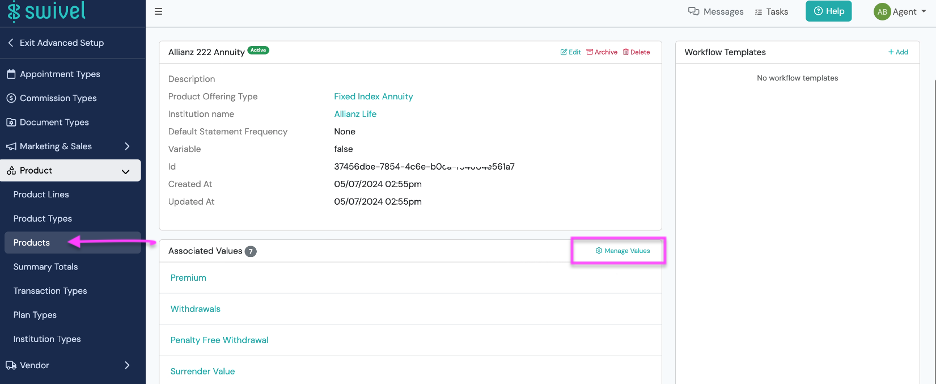
From the left-side navigation menu:
- Select Settings > Advanced Setup.
- Select the Products tab > Products.
- Click into the desired product.
- Navigate to the Associated Values tile and click Manage Values.
- Complete the Manage Values form.
- Click Save.
Manually Updating Product Value Data
Section titled “Manually Updating Product Value Data”- Navigate to the desired Contact.
- From the Product > click the Update Values button, then > click +New Entry.
- Complete the New Entry form.
- Click Save.
Why don’t I see the product value I need to map to a Swivel Summary total?
Section titled “Why don’t I see the product value I need to map to a Swivel Summary total?”If you’re trying to map a product value to a Swivel Summary total and the product value you need isn’t available, first check whether the carrier or institution is supported by Swivel Sync.
For Swivel Sync-supported carriers and institutions, the first successful sync of an instance of the product creates the supported product values. If no instances of the product have synced yet, sync a policy or account for that product first.
To see which carriers, institutions, and values are supported, visit the Values Supported section on the carrier or institution pages in Swivel Sync Carriers & Institutions.
If the carrier or institution isn’t supported by Swivel Sync, you can add the product values manually through Manage Values.
If the carrier or institution is supported by Swivel Sync and an instance of the product has successfully synced, but the value you need still isn’t available, the value may not be supported for that product. You can add a value manually through Manage Values if needed.
Manage Values is available to users with Owner or Manager permissions.
Why don’t I see the ‘Update Values’ button for my policy or account?
Section titled “Why don’t I see the ‘Update Values’ button for my policy or account?”If you don’t see the Update Values button on a policy or account, the button may not be available yet because values have not been created for the product or, for products associated with Swivel Sync-supported carriers and institutions, no instance of the product has successfully synced yet.
For products associated with Swivel Sync-supported carriers and institutions, the first successful sync of an instance of the product creates the supported product values, making the Update Values button available.
To see which carriers, institutions, and product values are supported, visit the Values Supported section on the carrier or institution pages in Swivel Sync Carriers & Institutions.
If the carrier or institution is not supported by Swivel Sync, you can create product values through Manage Values. You can also ask a user with Owner or Manager access to set them up for you. Once values have been created, the Update Values button will show automatically.