Marketing & Sales
Campaign Types
What are Campaign Types?
Section titled “What are Campaign Types?”Campaign Types refer to different strategies or approaches that you can use to promote your business and services to your target audience. Each Campaign Type has its own objectives, tactics and channels.
For example, your account is pre-configured with the following campaign types:
- Annual Review
- Seminar
- Email Outreach
By using different Campaign Types, you can effectively reach and engage your target audience to drive desired outcomes.
Adding Campaign Types
Section titled “Adding Campaign Types”-
From the left-side main menu, click the Settings tab > Advanced Setup
-
Select the Marketing & Sales section > click Campaign Types
-
From the Campaign Types page > click
 button
 -
Complete the New Campaign Type form
- Name
- Description
- Click Save
Editing Existing Campaign Types
Section titled “Editing Existing Campaign Types”-
Select the Campaign Types section
-
Go the Action Menu
 > select Edit for the campaign type you wish to edit.
 -
Complete the Edit Campaign Type form pop-up window.
- Name
- Description Optional
- Click Save
Merge Campaign Types
Section titled “Merge Campaign Types”-
From the left-side main menu, click the Settings tab > Advanced Setup
-
Select the Campaign Types section
-
From the Campaign Types page > click

-
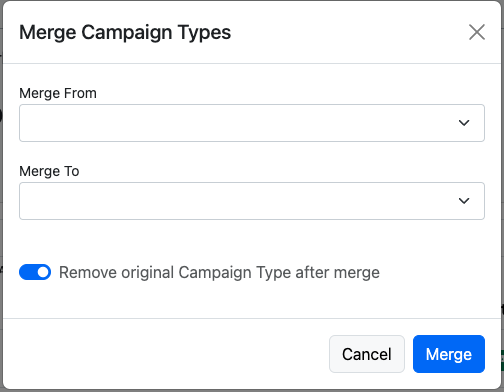
Complete the Merge Campaign Types form
- Merge From
- Merge To
- Remove original Campaign Type after merge recommended
- Click Merge.