

Email Options
Tracking Email Campaigns
Users can track the results of the email campaigns by viewing the Email Channel metrics.
Email Metric Tiles
Section titled “Email Metric Tiles”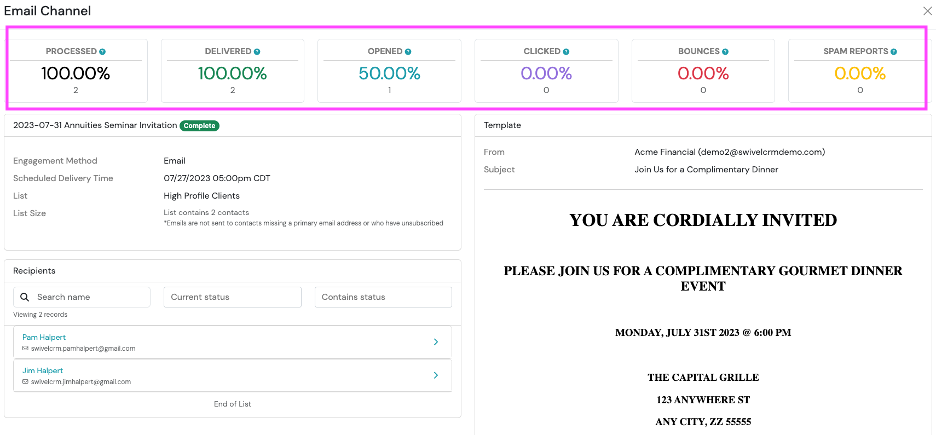
Processed
Section titled “Processed”Swivel has prepared the message to be delivered
Delivered
Section titled “Delivered”When an email has been accepted at the receiving server. This does not guarantee that the email was placed in the recipient’s inbox.
Opened
Section titled “Opened”When an email is viewed by the recipient.
Clicked
Section titled “Clicked”When an email recipient clicks a link within an email *may also display as other
Bounced
Section titled “Bounced”When a server cannot or will not deliver an email. Bounces are often caused by outdated or incorrectly entered email addresses. See also Blocked Emails and the Bounce Email Report.
Spam Report
Section titled “Spam Report”When an email is marked span by the recipient.
Filter Recipients by Status
Section titled “Filter Recipients by Status”-
Navigate to the Recipients tile
-
From the search bar, you can search by:
- Name
- Current Status (Processed, Delivered, Bounced, Opened, Clicked, Unsubscribed, Marked As Spam)
- Contains Status (Processed, Delivered, Bounced, Opened, Clicked, Unsubscribed, Marked As Spam)