User Management
Creating and Managing Agents Without User Accounts
Swivel lets you create agents that aren’t tied to a login. This guide explains the difference between users and non‑user agents, why you might create a non‑user agent, and how these agents appear and function in Swivel.
Understanding Agents and Users
Section titled “Understanding Agents and Users”- User – Someone who can log in to Swivel.
- Agent – An entity that can be assigned to records, policies, and commissions.
A user can also be an agent, but an agent does not need to be a user. This allows you to assign commissions or fees to your firm rather than to an individual user and track agent assignments without creating or managing a user in Swivel.
When to Create a Non‑User Agent
Section titled “When to Create a Non‑User Agent”You may create an agent that isn’t tied to a login in several scenarios:
- Assigning compensation to your firm rather than to an individual user.
- Listing an external individual as Agent of Record.
- Managing inherited or purchased business: if you have acquired a book of business, you can list the original writing agent on policies without giving them access to your Swivel account.
How Non‑User Agents Work
Section titled “How Non‑User Agents Work”Once created, non‑user agents:
- Appear in dropdowns such as Servicing Agent and Agent of Record.
- Can be assigned to policies and contact records.
- Can receive compensation attribution and be included in reports.
- Do not require a Swivel login or access permissions.
This allows you to assign agents, compensation, and responsibilities without creating or managing a user in Swivel.
Creating a Non‑User Agent
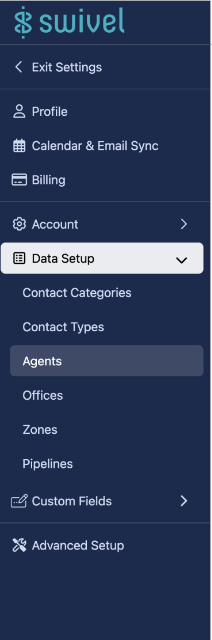
Section titled “Creating a Non‑User Agent”- Go to Settings → Data Setup → Agents.
- Click Add Agent.
- Enter the agent’s name (this can be a company or individual).
- Optionally, add additional details such as contact information or internal notes.
- Click Save.
After saving, the agent is ready to appear in dropdowns and reports just like a user-linked agent.
Managing Non‑User Agents
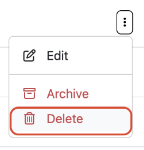
Section titled “Managing Non‑User Agents”- Duplicates: Merge or remove duplicate agent records to keep dropdowns and reports accurate.
- Compensation assignments: Confirm that non-user agents are correctly associated with policies or revenue.
- Naming conventions: Use consistent names to make agents easy to identify in reports and dropdowns.
Maintaining clean agent records helps ensure accuracy across your CRM and reporting.
Key Takeaways
Section titled “Key Takeaways”- Agents in Swivel do not need to be users.
- Non-user agents can represent companies, external agents, or legacy relationships.
- They can be assigned compensation, listed in dropdowns, and included in reports.
Agents in Swivel
Section titled “Agents in Swivel”In Swivel, an Agent can be a user role, as well as the person charged with servicing clients, writing policies, or the Agent of record. There may be times where you have an agent listed on a policy, but they are not a user in your account. For example:
- You have purchased or inherited a book of business and need to list the original writing agent on policies without giving them access to your account.
Agent FAQs
Section titled “Agent FAQs”How do I remove duplicate agents?
Section titled “How do I remove duplicate agents?”-
Navigate to Settings > click Data Setup > click Agents
-
Navigate to the duplicate record > click the action menu and select Edit