

Sending Text Messages to Contacts
Tracking Text Campaigns
Users can track the results of the email campaigns by viewing the Email Channel metrics.
Text Metric Tiles
Section titled “Text Metric Tiles”Users can track the results of the email campaigns by viewing the Email Channel metrics.
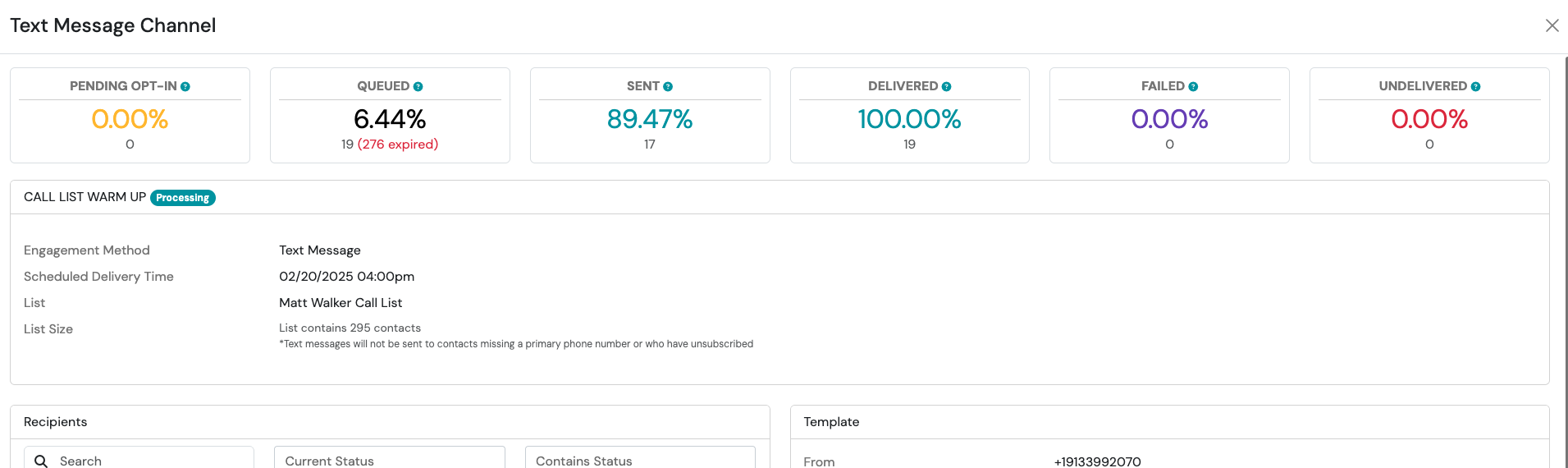
Pending Opt-In
Section titled “Pending Opt-In”The recipient has not completed the opt-in to receive text messages
Queued
Section titled “Queued”Text message is being prepared for delivery
The text message has been successfully accepted for delivery by the carrier. Please note, this does not guarantee that the recipient has received or viewed the message.
Delivered
Section titled “Delivered”The text message has been delivered successfully to the recipient by the carrier. Please note, this does not guarantee that the recipient has viewed the message.
Failed
Section titled “Failed”When a carrier cannot or will not deliver a text message.
Undelivered
Section titled “Undelivered”We have received a receipt indicating that the message could not be delivered.
Filter Recipients by Status
Section titled “Filter Recipients by Status”Until the messages are sent, the Recipients tile will display zero recipients. This view is designed to reflect campaign results only after message delivery has occurred.
-
Navigate to the Recipients tile
-
From the search bar, you can search by:
- Name
- Current Status (Pending Opt In, Queued, Sending, Sent, Receiving, Received, Delivered, Undelivered, Failed, Unsubscribed, Resubscribed)
- Contains Status (Queued, Sending, Sent, Receiving, Received, Delivered, Undelivered, Failed, Unsubscribed, Resubscribed)
Managing Opt-In Status
Section titled “Managing Opt-In Status”Understanding Pending Opt-In Contacts
Section titled “Understanding Pending Opt-In Contacts”When a contact has not yet opted in to receive text messages, they will appear with a status of Pending Opt-In and will be skipped during campaign sends. These contacts remain on the campaign list and will continue to be skipped on future sends until they opt in.
Opt-In Expiration Window
Section titled “Opt-In Expiration Window”When a contact is included in a campaign and has not yet opted in, Swivel sends them an opt-in request. If the contact does not respond within 30 days, their opt-in window expires. The next time that contact is included in a campaign send, Swivel will automatically send them a fresh opt-in request.
Manually Resending an Opt-In to a Single Contact
Section titled “Manually Resending an Opt-In to a Single Contact”If you need to send an opt-in request to a specific contact directly rather than waiting for the next campaign send, you can do this from the contact record. Navigate to the desired contact’s show page, click the Action Menu at the top right corner, select Communication Preferences, choose your Text Message Account Phone Number, and click Send Opt-In. This manual path bypasses the 30-day campaign opt-in window and can be used at any time.